Top 10 Passive DAC Cables for Data Centers?
A data center link can look simple: two switch ports, one short cable, and a row of blinking status lights. Yet the wrong connection can waste time during installation or fail a compatibility check. A Passive Dac Cable uses copper conductors to connect supported equipment over short distances, without optical transceivers inside the cable. That can make it a practical option for links within a rack or between nearby racks. Short runs matter.
This guide introduces ten passive DAC options worth comparing for data center use. It focuses on practical details: supported data rates, connector type, cable length, host compatibility, warranty, and vendor documentation. A model’s advertised speed alone does not guarantee it will work with every switch or server. Check the equipment vendor’s compatibility guidance and confirm the exact port standard before ordering. Measure the cable path, too. A tight bend behind a rack can turn a neat plan into a frustrating install.
There is no universal winner. A low-cost cable may suit a verified, short link, while a managed network may call for stricter qualification and support. The choices below are starting points, not lab-certified rankings; product revisions and compatibility lists can change. I would also verify details directly with the supplier, because listings sometimes leave out useful specifications. Small omissions matter. Compare the evidence, not just the headline.
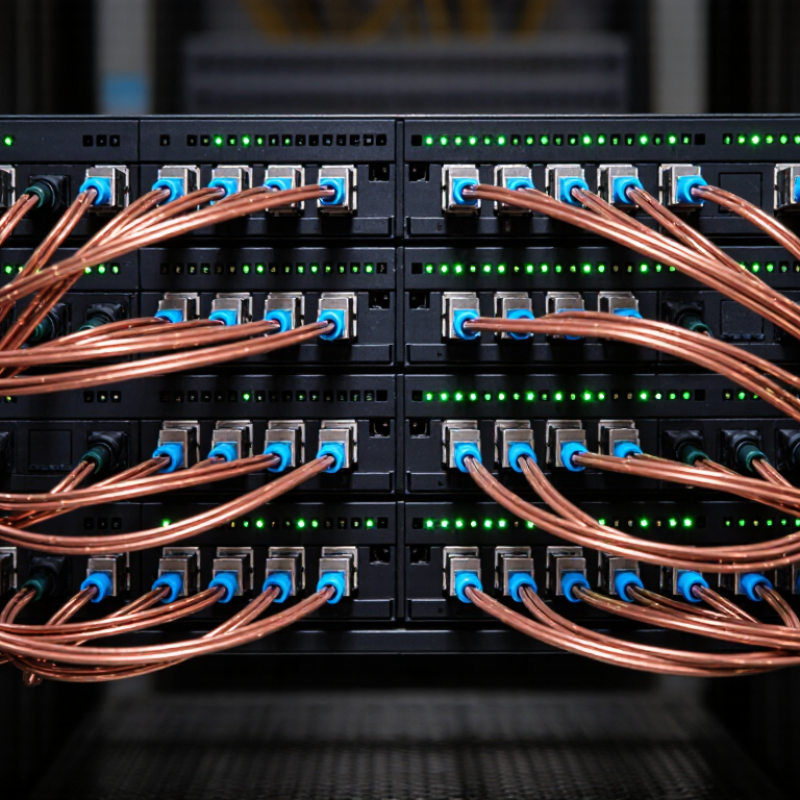
Passive DAC Cable Basics for Data Center Connectivity
Passive direct-attach copper (DAC) cables connect switches, servers, or storage ports across short data-center runs. A twinax copper assembly carries signals between fixed transceiver ends, with no optical conversion or separate cable power. No optics required. That simplicity can mean lower cost and power than optical links. Reach is limited, though, and depends on speed, cable gauge, and platform compatibility.
The Ethernet Alliance’s 2024 Ethernet Roadmap tracks 800GbE and 1.6TbE as emerging data-center speed generations. That makes link planning important: a DAC suited to a short 100GbE connection may not meet a higher-rate port’s reach or signal-integrity needs. Check the interface standard, supported cable length, connector type, and switch documentation before ordering. Measure the route, including slack and bend space behind the rack. Specs can look deceptively simple.
Tips: Use DACs for short, predictable links, especially within a rack. Confirm both endpoints support the cable’s speed and coding. Keep a spare labeled by length. For crowded or longer routes, test under real traffic; a tidy cable map does not guarantee clean links.
Key Criteria for Comparing Passive DAC Cables
Key Criteria for Comparing Passive DAC Cables
When comparing passive direct-attach copper cables, start with port compatibility. Both devices must support the cable’s connector type and data rate. Check the equipment documentation or compatibility list before ordering. A matching plug does not guarantee a working link. That catches people out. Confirm whether the cable is intended for the specific ports at both ends, especially when connecting different device types.
Then check the required link speed and distance. Passive DACs suit short connections within a rack or between nearby racks; longer runs may need another cable type. Measure the actual route, including turns and slack, rather than relying on the gap between rack faces.
Length is only one practical detail. Cable thickness and flexibility affect routing through crowded cabinets, while a tight bend can put stress on connectors. Compare the cable’s stated power use and operating range with the equipment requirements. In a dense rack, heat and airflow matter. Check connector latches, cable labeling, and whether technicians can identify each link without unplugging it.
Small details matter.
If possible, test a sample under real traffic before deploying many cables. Record link status, error counts, and any fit issues.
One caveat: published specifications do not always capture the awkward realities of an older rack or mixed equipment. A simple comparison sheet helps, but hands-on verification is still worth the time.
Top 10 Passive DAC Cables for Data Center Use
For data center use, passive direct-attach copper (DAC) cables suit short links between switches and servers, especially within a rack. They carry electrical signals without optical conversion or cable-side retiming, which can help reduce power and cost. But reach depends on the cable assembly and port specifications; a tidy cable tray cannot fix a mismatched link.
The Ethernet Alliance’s 2024 Ethernet Roadmap tracks development toward 800GbE and 1.6TbE, making lane speed and port compatibility important selection checks. For a top-ten shortlist, compare supported data rates, connector type, stated cable length, and vendor-tested compatibility.
Check airflow, too: thick copper bundles can crowd the space behind a switch. Short runs matter. Still, a specification sheet may not reflect the awkward bend beside a fully loaded rack. That deserves a real fit check.
Tips: Confirm both endpoint specifications before ordering. Keep DAC lengths only as long as needed, label each end, and test the link under load. Passive cables are not universal; verify compatibility with the actual ports.
How to Match DAC Cables to Network Equipment
Matching a passive direct-attach copper cable starts with the exact port type and link speed, not the rack’s appearance. SFP+ and SFP28 connectors may look similar, but the equipment must support the intended rate and cable coding. Check both ends. Confirm that each switch or server port accepts passive DACs; some ports require particular cable types or firmware settings. Compare the cable’s rated length with the actual route, including room for routing. Passive copper uses no optical transceivers, but its reach is limited and depends on speed and cable design. A neat, tightly stretched run is not a good fit.
For a top-of-rack switch and nearby server, a short, supported cable can reduce clutter and avoid separate optics. Measure the route, not just the straight-line gap. Leave enough room for servicing, but avoid sharp bends; copper assemblies can be stiff in dense racks. Check the connector family at both ends, since breakout cables and port layouts can complicate a match. Verify the exact cable specification against equipment manuals, then test link status and negotiated speed after installation. If the link falls back or fails, check coding, speed support, and length before replacing hardware. This detail is easy to miss. Compatibility information may also lag firmware changes, so record tested combinations and review them after upgrades.
Installation, Compatibility, and Maintenance Considerations
When comparing ten passive DAC cables for data centers, start with the switch and server ports, not the cable price. Check supported data rates, connector type, and vendor compatibility notes for both ends. A cable that fits physically may still fail to link. Test the exact cable and port combination before ordering a full rack’s worth.
Length matters. Passive copper DACs are typically used for short connections, and the supported distance depends on the data rate and equipment. Measure the actual route, including slack for service access, rather than choosing by rack height alone. Keep bends broad; a cable sharply folded behind a server can strain its connectors. Leave enough clearance for nearby airflow and removable components. It is easy to overlook.
During installation, label both ends with rack, device, and port information. Seat each connector firmly, then confirm link status and negotiated speed through the switch interface. Record the cable length and part specifications in the asset inventory. Small details help when a link drops at 2 a.m.
For maintenance, inspect connectors for dust, bent latches, or looseness during scheduled work. Avoid pulling a cable by its wire; release the latch and grip the housing. Replace damaged cables rather than repeatedly reseating them. Compatibility lists can change with firmware or hardware revisions, so verify them again after upgrades. Our planning is not always perfect, and a spare tested cable can save time.
Top 10 Passive DAC Cable Options for Data Centers
Representative maximum cable lengths commonly offered for passive direct-attach copper links
Lengths are representative product limits, not universal guarantees; available options vary by cable construction and equipment. Before installation, confirm both port compatibility and supported link speed, check cable routing and bend limits, and label connections for easier maintenance. For longer runs, consider optical cabling.

